カテゴリ
- 学童・教育用品(6)
絞り込み
ブランド
- SPARKFUN
- モノタロウ(1)
- Gechic(ゲシック)(6)
- ビット・トレード・ワン(6)
- Seeed Studio(6)
- ブロードウォッチ(4)
- Raspberry Pi(4)
- 多摩デバイス(4)
- みんなのラボ(3)
- 共立電子産業(2)
- Adafruit(2)
- Pimoroni(2)
- LINKMAN(2)
- Pico Technology(2)
- アズワン(1)
- A&D(エー・アンド・デイ)(1)
- ワンダーピュア(1)
- Raspberry Pi(ラズベリーパイ)(1)
- DIGILENT(1)
- RIGOL(リゴル)(1)
- ブランドをもっと見る
「raspberry pi 7」の検索結果
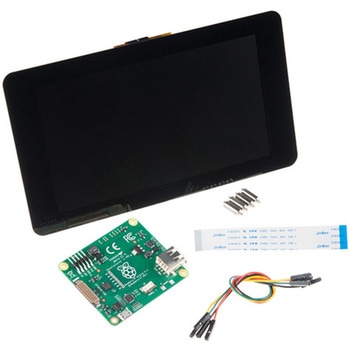 Raspberry Pi 7インチLCDタッチスクリーンSPARKFUN
¥35,980税込¥39,578
1セット
33日以内出荷
Description。This 7" Raspberry Pi Touchscreen LCD provides you with the ability to create a standalone device that can be utilized as a custom tablet or an all-in-one interactive interface for a future project using your Raspberry Pi 3. Each LCD features a full color 800×480 capacitive touch display that connects to the Pi via an included adapter board which handles all of your power and signal conversion needs. An updated version of Raspbian OS on the A+, B+ and Pi2B is required for the display to work(the display does not work with the current version of Raspbian available on the Model A or B).。What makes this LCD great is the fact that it only requires two connections to be hooked up to the Pi; power from the Pi's GPIO port and a ribbon cable that connects to the DSI port present on all Raspberry Pi's. Touchscreen drivers with support for 10-finger touch and an on-screen keyboard allow you to use your Raspberry Pi without an external keyboard or mouse.。With this Raspberry Pi LCD you can create your own 'Internet of Things'(IoT)devices including a visual display by simply connecting your Pi, developing a easy Python script to interact with the display, and you'll be ready to create your own home automation devices with touch screen capability.。Note:The latest version of Raspbian OS is required for this Raspberry Pi LCD to operate correctly.。Features。7" Touchscreen Display.。Screen Dimensions:194mm×110mm×20mm(including standoffs)。Viewable screen size:155mm×86mm。70 degree viewing angle。Screen Resolution 800×480 pixels @ 60fps。24-bit color。10 finger capacitive touch.。Connects to the Raspberry Pi board using a ribbon cable connected to the DSI port.。Adapter board is used to power the display and convert the parallel signals from the display to the serial(DSI)port on the Raspberry Pi.
アズワン品番67-0457-43
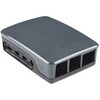
 Official Raspberry Pi 4 Case - Black/GraySPARKFUN
¥2,298税込¥2,528
1個
33日以内出荷
。Description。The official case for the Raspberry Pi 4. This case ships as two parts made of ABS plastic with access to all USB, HDMI, Audio/Video, USB and Ethernet ports. In addition, a slot on the bottom gives access to the MicroSD card. The top and bottom parts are press fit and comes in two-tone black and gray.
アズワン品番67-0426-07
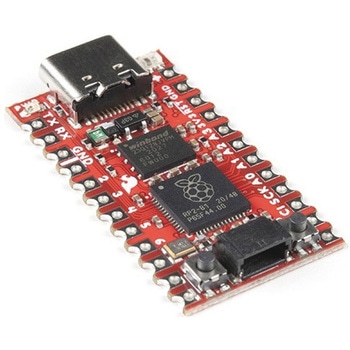 SparkFun Pro Micro - RP2040SPARKFUN
¥4,498税込¥4,948
1個
33日以内出荷
Description。The SparkFun Pro Micro RP2040 is a low-cost, high performance board with flexible digital interfaces featuring the Raspberry Pi Foundation's RP2040 microcontroller. Besides the good 'ol Pro Micro footprint, the board also includes a WS2812B
アズワン品番67-0430-07
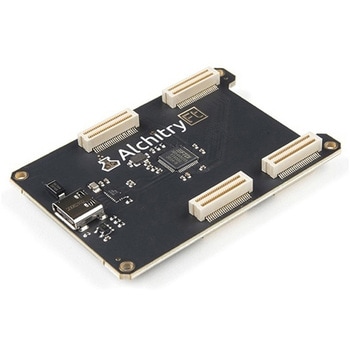 Alchitry Ft Element BoardSPARKFUN
¥10,980税込¥12,078
1個
33日以内出荷
Description。Meet the Alchitry Ft Element Board! Alchitry Elements are expansion boards similar to Arduino shields or Raspberry Pi HATs that work with your Au and Au+ FPGA Development Boards. The Ft Element is equipped with four 50-pin board to board connectors on the underside and top of the board that snap to the Alchitry Au and Au(+)boards. It also adds a USB 3.0 200MB/s high speed interface to your Alchitry board stack via the USB-C connector.。Please note that this board is only functional with the higher end Au Au+ FPGA Dev boards that feature the Xilinx Artix 7.。Get Started with our Learning FPGA Tutorials。Features。USB-C connector w/ 200MB/s data rate to board to board connectors。For use with projects that require data transfer rates greater than standard on board USB to serial 12Mbaud
アズワン品番67-0423-43
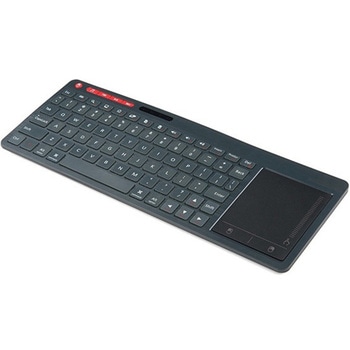 Multimedia Wireless KeyboardSPARKFUN
¥9,998税込¥10,998
1個
33日以内出荷
Description。With Single-Board Computers(SBCs)on the rise, it is a good idea to have an easy way to interface with them. Operating on a 2.4GHz frequency, the Multimedia Wireless Keyboard possesses a normal-sized key layout, media controls and a multitouch track pad. This keyboard is powered by a built-in 850mAh LiPo battery, providing you with 500--700 hours of use. Even if you don't have a Raspberry Pi, BeagleBone or another SBC, this keyboard can work with smart TVs, mobile devices and full-blown PCs!。The Multimedia Wireless Keyboard can be charged via the attached USB cable, which stores in the same compartment as the wireless USB receiver. The track pad on the wireless keyboard not only features left and right click options, but also a scroll function. Measuring less than an inch thick, this wireless keyboard is an ideal product for on-the-go situations.。Note:The attached USB cable is for charging purposes only.。Features。317.2mm×123.6mm×18.3mm(12.4in×4.8in×0.7in)。System Requirements:HID-Compatible Device。USB Port。Windows 2000, XP, CE, Vista, 7, 8 or Higher。Linux(Debian-3.1, Red Hat-9.0, Ubuntu-8.10, Fedora-7.0)。Android OS
アズワン品番67-0429-22
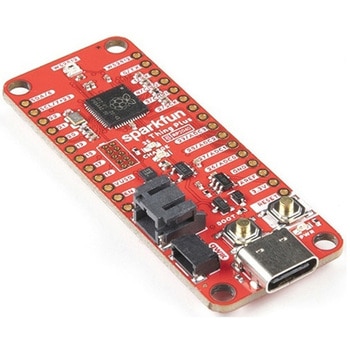 SparkFun Thing Plus - RP2040SPARKFUN
¥6,698税込¥7,368
1個
33日以内出荷
Description。The SparkFun Thing Plus - RP2040 is a low-cost, high performance board with flexible digital interfaces featuring the Raspberry Pi Foundation's RP2040 microcontroller. Besides the Thing Plus or。Feather。footprint(with 18 GPIO pins), the board also includes an SD card slot, 16MB(128Mbit)flash memory, a JST single cell battery connector(with a charging circuit and fuel gauge sensor), an addressable WS2812 RGB LED, JTAG PTH pins, four(4-40 screw)mounting holes, and our signature Qwiic connector.。The RP2040 contains two ARM Cortex-M0+ processors(up to 133MHz)and features:264kB of embedded SRAM in six banks。6 dedicated IO for SPI Flash(supporting XIP)。30 multifunction GPIO:Dedicated hardware for commonly used peripherals。Programmable IO for extended peripheral support。Four 12-bit ADC channels with internal temperature sensor(up to 0.5 MSa/s)。USB 1.1 Host/Device functionality。The RP2040 is supported with both C/C++ and MicroPython cross-platform development environments, including easy access to runtime debugging. It has UF2 boot and floating-point routines baked into the chip. While the chip has a large amount of internal RAM, the board includes an additional 16MB of external QSPI flash memory to store program code.。The SparkFun Qwiic Connect System is an ecosystem of I2C sensors, actuators, shields and cables that make prototyping faster and less prone to error. All Qwiic-enabled boards use a common 1mm pitch, 4-pin JST connector. This reduces the amount of required PCB space, and polarized connections mean you can't hook it up wrong.。Get Started With the Thing Plus RP2040 Hookup Guide。Features。SparkFun Thing Plus - RP2040 Features。Raspberry Pi Foundation's RP2040 microcontroller。16MB QSPI Flash Memory。JTAG PTH Pins。Thing Plus(or Feather)Form-Factor:18[1]x Multifunctional GPIO Pins[2]。Four available 12-bit ADC channels with internal temperature sensor(500kSa/s)。Up to eight 2-channel PWM。Up to two UARTs。Up to two I2C buses。Up to two SPI buses。USB-C Connector:USB 1.1 Host/Device functionality。2-pin JST Connector for a LiPo Battery。(not included)。500mA charging circuit。Qwiic Connector。Buttons:Boot。Reset。LEDs:PWR。- Red 3.3V power indicator。CHG。- Yellow battery charging indicator。25。- Blue status/test LED(。GPIO 25。)。WS2812。- Addressable RGB LED(。GPIO 08。)。Four Mounting Holes:4-40 screw compatible。Dimensions:2.3"×0.9"。RP2040 General Features。Dual Cortex M0+ processors, up to 133 MHz。264 kB of embedded SRAM in 6 banks。6 dedicated IO for QSPI flash, supporting execute in place(XIP)。30 programmable IO for extended peripheral support。SWD interface。Timer with 4 alarms。Real time counter(RTC)。USB 1.1 Host/Device functionality。Supported programming languages。MicroPython。C/C++。1.。Note:。GPIO 08。is not included in this count, as it passes through the WS2812 addressable RGB LED first.。GPIO 07。and。GPIO 23。are counted as a single GPIO because they are tied together.。2.。Note:The GPIO pins are programmable so you can reconfigure the pins! Check out the RP2040 datasheet for more information on the GPIO functionality.
アズワン品番67-0423-56